
Duration: .. minutes
Based on:
1. Set-Up
1.1
1.2 Restore state from backup copy
Copy the code, right-click in PowerShell window to paste it and press Enter to execute
cd ~/Documents/git-workoutsCopy-Item bak-2.4 current -Recurse -Forcecd current2. Make first commit
2.1 Switch into branch
Type in PowerShell prompt and press Enter to execute
git switch posts2.2 Create file
Type in PowerShell prompt and press Enter to execute
New-Item posts.md2.3 Stage changes
Type in PowerShell prompt and press Enter to execute
git add -A2.4 Commit changes
Type in PowerShell prompt and press Enter to execute
git commit -m "Add posts.md"3. Make second commit
3.1 Add content into the file
Type in PowerShell prompt and press Enter to execute
Set-Content -Path "posts.md" -Value "# Posts"3.2 Stage changes
Type in PowerShell prompt and press Enter to execute
git add -A3.3 Commit changes
Type in PowerShell prompt and press Enter to execute
git commit -m "Add title into posts.md"3.4 View commit history
Type in PowerShell prompt and press Enter to execute
git log --oneline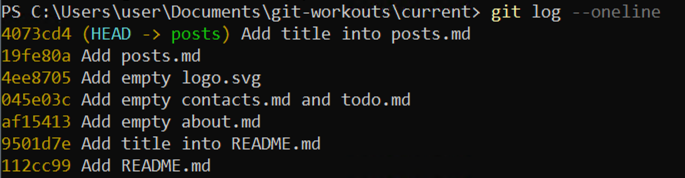
3.5 Rebase current branch to state of master branch
Type in PowerShell prompt and press Enter to execute
git rebase master3.6 View commit history
Type in PowerShell prompt and press Enter to execute
git log --oneline --graph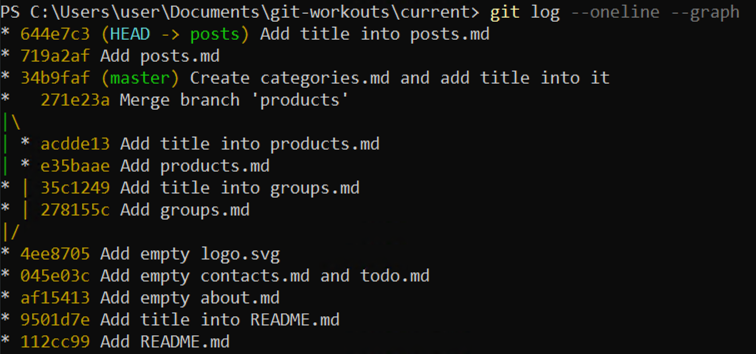
4. Merge changes into master
4.1 Switch into master branch
Type in PowerShell prompt and press Enter to execute
git switch master4.2 Merge changes
Type in PowerShell prompt and press Enter to execute
git merge posts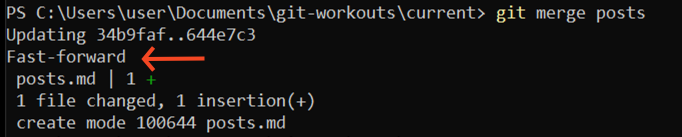
4.3 View commit history
Type in PowerShell prompt and press Enter to execute
git log --oneline --graph -n 10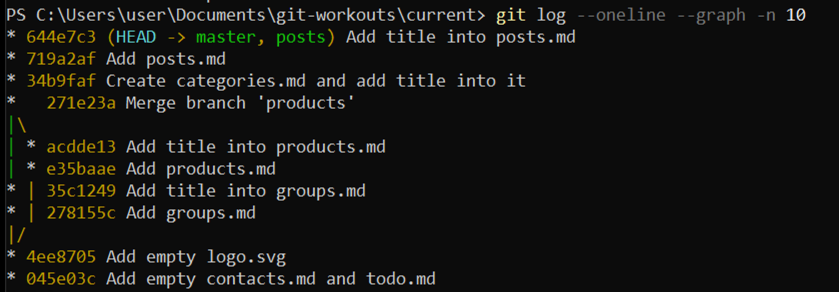
Additional Info
The -n <number> parameter tells Git to display only the last <number> commits.
This is useful when you only need to see the most recent ones.
4.5 Delete branch
Type in PowerShell prompt and press Enter to execute
git branch -d posts5. Wrap-Up
5.1 Make backup copy
Copy the code, right-click in PowerShell window to paste it and press Enter to execute
cd ..Copy-Item current bak-2.5 -Recurse -ForceRemove-Item current -Recurse -Force